Powerful NC Program Optimization
MANUSsim Optimize

Precise NC optimization for real machining results.

MANUSsim Optimize analyzes the real NC program and optimizes it by accelerating and eliminating air cuts where possible, while also introducing variable cutting feedrates for optimal cutting conditions  achieving 10 to 40% machining time reduction.

10-40%

Faster Cycle Times

Real optimization results

10-40%

Cycle Time Reduction

100%

Toolpath Integrity

3

Optimization Modules

10+

Supported Controllers

Advanced, Cost Effective NC Program Optimization Tool

MANUSsim Optimize analyzes the real NC program and optimizes it by accelerating and eliminating air cuts where possible, while also introducing variable cutting feedrates for optimal cutting conditions  achieving 10 to 40% machining time reduction.

*When you download the free MANUSsim demo, you'll also get access to the MANUSsim Optimize demo inside it.

Increase Your Efficiency With 3 Different Ways

Air Cut Feedrate Optimization

MANUSsim Optimize detects air cuts such as touch moves and no-contact moves directly from the real G-code and accelerates their feed rates automatically. You can freely assign different feedrates to touch moves and no-contact moves, exactly as you see fit. Same CAM. Same program. Shorter cycle time.
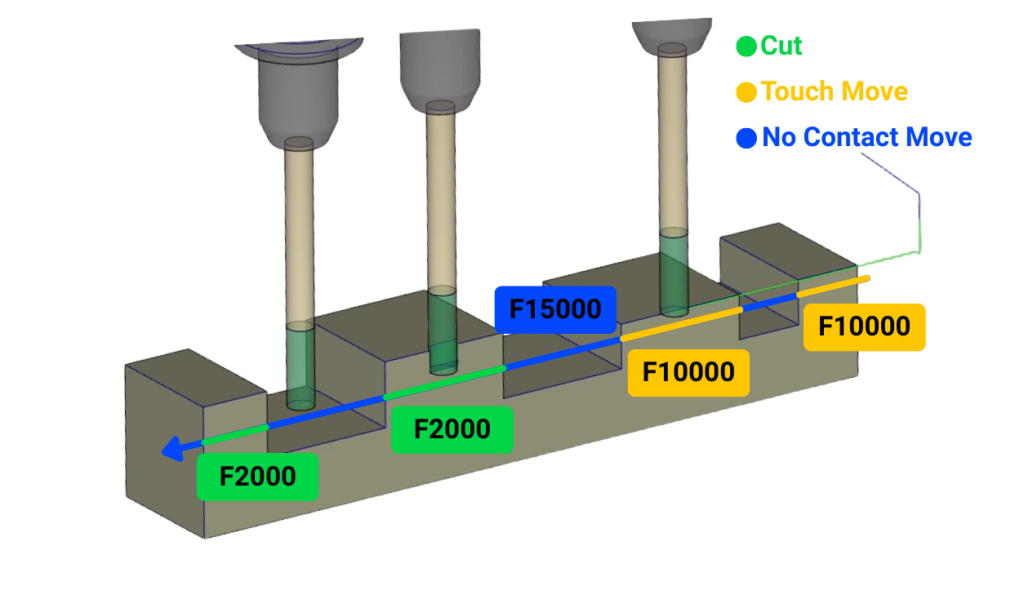
Air Cut Feedrate Optimization
Optimization visual

Air Cut Minimization

MANUSsim Optimize detects unnecessary home returns and long retracts in real G-code and safely reduces them to the minimum required distance above the surface. This reduction is performed by fully accounting for stock and fixture geometry, ensuring collision-free operation at all times.

Air Cut Minimization

Cutting Feedrate Optimization

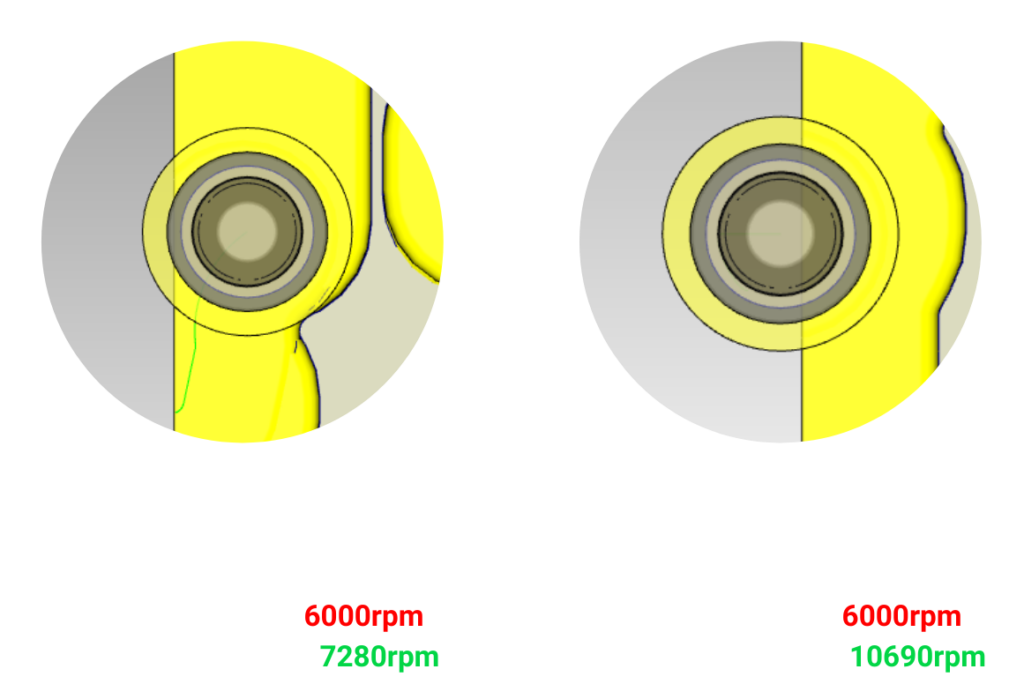
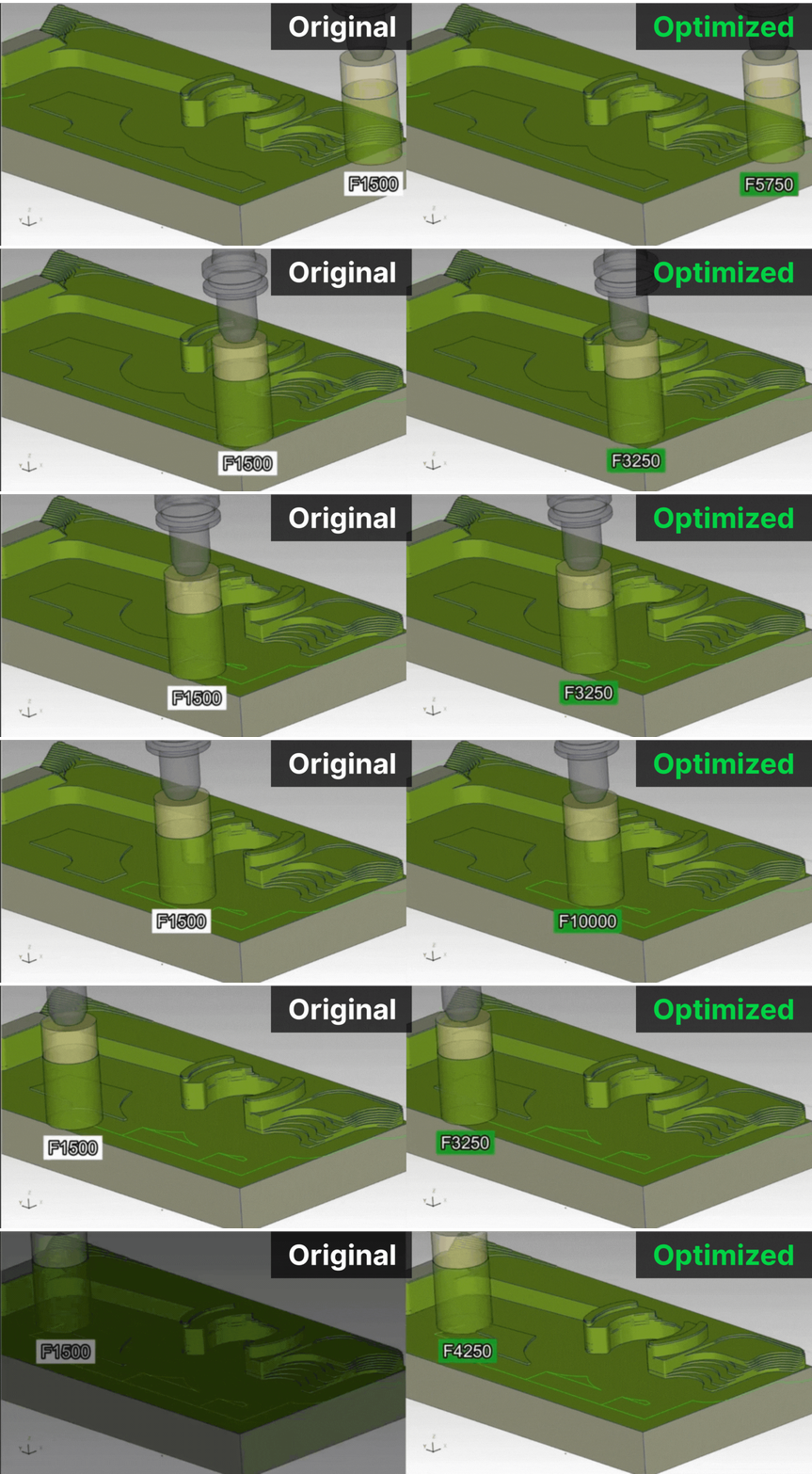
By simulating your NC programs we can accurately detect the chip geometry alongside depth and width of cut. Using this data we optimize your cutting feedrates by introducing variable feedrates achieving cycle time reductions typically in the range of 10% to 40%.

Cutting Feedrate Optimization
Feedrate optimization detail

The Math is Simple

Every percent of cycle time reduction translates directly to your bottom line.

10 min

saved per part

@ 100 parts/week = 1,000 min/week

16.6 hrs

saved weekly

Equivalent to 2+ full shifts

$50K+

annual savings

Based on average machine hour rates

Optimization in 3 Simple Steps

1

Load Your NC Program

Import the verified NC code directly from MANUSsim simulation or load any G-code file.

2

Auto-Analyze & Optimize

MANUSsim Optimize detects air cuts, analyzes chip geometry, and defines variable feedrates for every segment.

3

Export Optimized Code

Download the optimized NC program with improved feed rates and minimized air cuts — toolpath geometry untouched.

Frequently Asked Questions

How does MANUSsim Optimize reduce machining time?
MANUSsim Optimize works inside MANUSsim G-code simulation software. Since MANUSsim can analyze and simulate everything your CNC will do by simulating the actual G-code, it can detect every movement. By using this data, MANUSsim Optimize finds all unnecessary movements and eliminates them or speeds them up. It can also detect cutting feedrates and chip geometry during cutting, defining variable feedrates depending on the chip geometry for optimal results.
Do I need a specific CAM software to use MANUSsim Optimize?
No. MANUSsim Optimize supports G-code generated by various CAM systems. As long as your output is standard or customized G-code, you can optimize it within MANUSsim Optimize.
Does it affect machining precision or part quality?
No. MANUSsim Optimize reduces your machining time without ever sacrificing your precision or quality.
Which CNC machines and controllers are supported?
As long as your CNC machine is present in our simulation library or you can provide a 3D model, MANUSsim Optimize can optimize your G-code. It supports all major NC controllers including Fanuc, Heidenhain, Okuma OSP, Siemens Sinumerik, Fagor, Mazatrol, Fidia, Mitsubishi, Haas and Millplus.
Do I need advanced CNC knowledge to use it?
No. MANUSsim Optimize automatically detects inefficiencies and either eliminates them or defines new feedrate values. However, if you have advanced knowledge, it also allows you to define values on your own according to your preferences.
Is there a free demo license for MANUSsim Optimize?
Yes. You can access a free MANUSsim Optimize demo license by downloading the MANUSsim demo via MANUSsim Editor. The Optimize demo is included automatically. Note that the demo is limited by NC line count.
Can I try MANUSsim Optimize on my own CNC part?
Yes. With the "Try Optimization on Your Own Part" button, you can contact us for a demo. Our team performs the optimization and sends you the optimized NC program, allowing you to directly compare cycle times and see the potential time savings.

Ready to Verify Your Real G-Code?

Join 600+ manufacturers who trust MANUS for CNC post-processing, simulation, and optimization. See the difference real G-code simulation makes.

Don't miss our updates